


Reuters - Breaking World News
4.62.48K Reviews
App Specs
- Version
- 7.48.0
- Updated On
- License
- Free
- Downloads
- 1,000,000+
- Developer
- Thomson Reuters
- Categories
- News & Magazines
- Platform
- Android, iOS
Screenshots
 Analysis by AppCompare
I judge a news app not only by the stories it surfaces, but by what happens when I try to use it at an inconvenient moment: in a station with patchy reception, between errands, or when I have only a minute to spare. Reuters is a free news and magazines app from Thomson Reuters, and its strongest appeal is a familiar one: a focused way to follow international reporting without making a general-purpose social feed the starting point. The experience still depends on having a usable connection for current coverage, so the way you read and check back matters.
When the connection becomes part of the reading experience
Opening a news app during a developing story is different from reading a saved article. Headlines and live coverage are useful precisely because they can change, but that makes connectivity important: if reception is weak, refreshing or loading a story may interrupt the moment when you want a quick update. I treat the app as a place to check the latest picture when I have a steady connection, rather than assuming every page will be ready instantly wherever I am.
That distinction is especially helpful during breaking news. A headline can tell me what has happened, while a developing story needs context and follow-up. If a page is slow to load, I avoid drawing a conclusion from a notification or a short snippet alone; I wait until I can open the report and read the fuller account. That is a sensible habit with any live news source, and it matters more when the network is unreliable.
Short mobile sessions work best with a reading plan
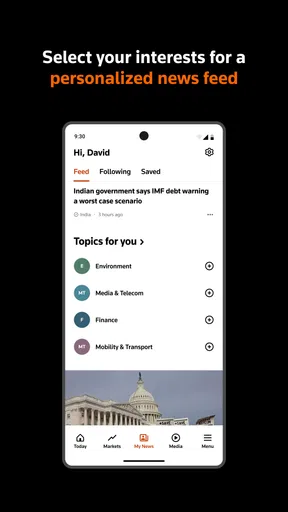
On a phone, I find it useful to decide what I came to check before opening a feed. A quick scan of major stories is one task; following a particular subject is another. Reuters lets readers customize their feed around topics, so I would use that choice to make short visits more purposeful: keep the subjects I genuinely follow visible, then return to broader coverage when I have time. This is more practical than scrolling without a stopping point.
For example, on a commute I might check a headline before leaving a connected area, then read the complete report once I have a stable signal. If I am watching a live broadcast, I would choose a place where the connection is dependable and where listening or viewing is appropriate. Live video can add immediacy that a written update cannot, but it is not always the best option in a noisy, crowded, or data-conscious setting.
Recovering from interruptions without losing perspective
Mobile reading is easily broken up by calls, route changes, and weak reception. When I return to an article after an interruption, I check the latest version rather than assuming the details are unchanged. This is particularly important for fast-moving events, where an early account may be clarified as more information becomes available. A report is a snapshot of what is known at that point, not a promise that the story has stopped developing.
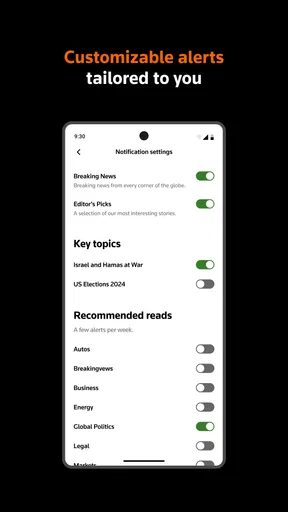
Notifications can help surface important events, but I would keep them selective. Choosing only the alerts that matter to me reduces interruptions and makes it more likely that I will pay attention when a notification does arrive. If I am busy, I can leave a headline for later instead of trying to read a complex story in fragments. That small choice makes the app feel more like a deliberate news source and less like another stream demanding constant attention.
Worth Reading Before You Choose

Flipboard Shows What News Apps Must Do Beyond the Feed

Switching to Android Auto Means Rethinking Your Driving Routine

Google Calendar Makes a Crowded Week Easier to Manage

Ludo King Makes the Most of the Minutes Between Plans

Baby Panda World Brings Quick Play to Modern Phones, but Its Game Library Feels Busy

ESPN’s Live Game View Makes Following Close Games Easier
Keeping an eye on data use
Text-first reading is usually the more practical choice when I am trying to conserve mobile data or battery. Images and live broadcasts make coverage richer, but they also make a quick check less lightweight than simply reading a headline and article. I would save video for times when I have a reliable connection and a real reason to watch, rather than letting it become the default way I catch up.
If data use is a concern, I also avoid opening several stories just because they appear in the feed. I choose one or two that answer the question I came with, then stop. The benefit is not only lower unnecessary use; it keeps news from swallowing a short break. Anyone who wants continuous video, offline reading, or finely detailed control over every connection behavior should check those needs against the current app experience before making it their main source.
A World of News, Simplified
Have you ever found yourself endlessly scrolling through news feeds, trying to keep up with the world? Well, I recently stumbled upon the Reuters - Breaking World News app, and let me tell you, it’s a game-changer. Imagine having a world of news at your fingertips, presented in a sleek, easy-to-navigate format. Let's dive into the deets of this app, which is available on both Android and iOS.
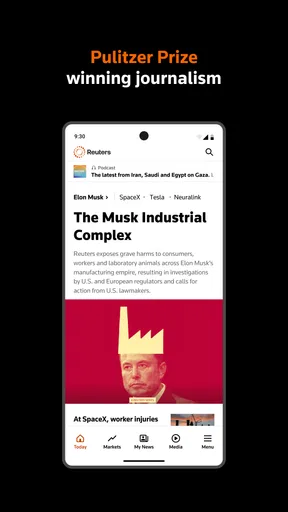
First off, the layout of the Reuters app is super intuitive. You’re greeted with a clean homepage that highlights the top stories of the moment. What I love is how these stories are organized—there’s no clutter, just the news you need to know. The app covers everything from politics to tech, and even those feel-good human interest stories we all need sometimes.
Features That Stand Out
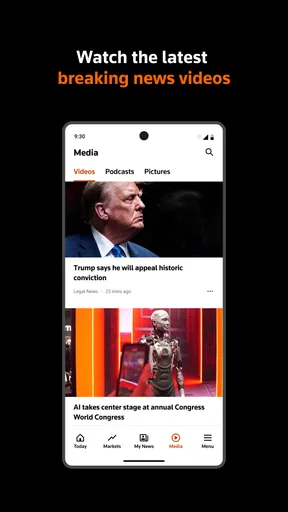
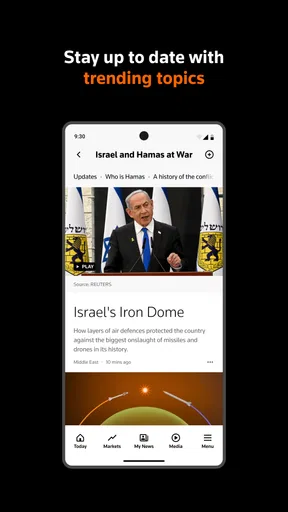
One of the coolest features is the live feed option. This allows you to watch live broadcasts right from your device. Whether it’s a major political event or breaking news, you can stay up-to-date in real-time. This is perfect for those moments when you need more than just a headline.
Another neat feature is the ability to customize your news feed. You can select topics that matter to you, and the app will tailor the news to fit your interests. I found this super handy because, let’s be honest, we all have those niche topics we’re secretly obsessed with.
That topic choice is most valuable when you use it with a clear purpose rather than treating it as a way to exclude everything outside your interests. I like a focused feed for regular subjects, but I would still make room for the broader top stories: an unexpected international event may matter even if it is not part of my usual reading routine. Personalization saves time, yet it can also narrow the window through which a reader sees the day. A quick check of the main coverage alongside selected topics is a useful balance.
Easy Navigation and User Experience
Navigating the app is a breeze. With a simple swipe, you can move between sections or dive deeper into a story. The text is easy to read, and the images are crisp, making the whole experience very engaging. I also appreciate the offline mode, which allows you to download articles for reading later. Perfect for those long commutes or when you’re stuck without Wi-Fi.
For a practical routine, I would use the commute in two parts: check what is current while I still have a good connection, then use the reading time to work through a story rather than repeatedly refreshing a feed in a tunnel or on a crowded route. The original experience described here includes downloading articles, which can make that handoff more convenient. I would still confirm that the particular story I want is available for later reading before relying on it, especially if I expect to be without service for a long stretch.
The app is not the same kind of tool as a news aggregator that pulls together many publishers, nor is it a social platform where trending posts and reactions are the main way stories reach you. Reuters puts its own reporting at the center, which is a strength if I want a direct editorial source and a comparatively uncluttered read. The trade-off is that readers who want a broad mix of outlets, local community updates, or a personalized stream built from many publishers may prefer an aggregator alongside it.
Why It Stands Out
What really sets this app apart is its commitment to delivering unbiased news. In a world where we’re bombarded with information, it’s refreshing to have a source that strives to keep things straight. Reuters has a long-standing reputation for impartial reporting, and this app is a testament to that legacy.
I still recommend reading a report with the same care I would bring to any source: distinguish confirmed details from early claims, notice when a story is developing, and compare coverage when a topic is especially consequential. A reputation for impartial reporting is a reason to give Reuters a place in my reading habits, not a reason to stop thinking critically. For someone who wants one dependable starting point for international news, that distinction is important.
The app has a 4.4 average from around 21,000 ratings and more than a million installs, which suggests it has found a substantial audience. Thomson Reuters has maintained it through version 7.33.0, and the app is rated for Everyone 10+. Those details offer useful context, but they do not tell me whether its mix of topics and presentation suits my daily routine; the best test is whether I return to it for the kinds of stories I actually follow.
The app is free to download, with in-app purchases ranging from $0.99 to $209.99 per item. I would check the purchase details shown in the app before committing to anything, particularly if I only want basic news reading. Reuters first appeared on February 21, 2014, and requires Android or iOS 10 or later. That makes compatibility worth checking on an older device before planning to rely on it during travel or a busy workday.
The best fit, in my view, is someone who wants a recognizable international news source, likes to follow selected subjects, and values the option of live broadcasts as well as written reports. It is less suitable as the only news app for a reader whose main need is neighborhood alerts, a wide blend of independent publishers, or a fully predictable experience in places with no dependable connection. I would pair it with a local source if local service information is what I need, rather than expecting a global newsroom to cover that role.
A realistic use case is a reader who sees a major story during a lunch break, checks the headline and Reuters coverage, then follows the subject later when there is time to read more carefully. Topic customization can keep that follow-up easy to find, while selective notifications can flag developments without turning the day into a chain of interruptions. If the connection drops, I would avoid repeatedly reopening the same page; waiting for a stable signal and checking the current report is a calmer way to catch up.
Final Thoughts
All in all, the Reuters app is a must-have for news junkies or anyone who wants to stay informed without drowning in information. It’s user-friendly, customizable, and most importantly, it’s reliable. Whether you’re on Android or iOS, this app is definitely worth a download.
So, if you’re ready to elevate your news game, give this app a whirl. You won’t regret it!
My connectivity verdict
I would use Reuters as a regular source when I have a connection and want a clean route into international reporting, not as a guarantee of uninterrupted updates everywhere. Its mix of top stories, topic selection, alerts, and live broadcasts gives me different ways to follow the news, but each works best when matched to the moment: text for a quick check, a fuller article when I can concentrate, and live coverage when the network and setting make it practical.
My advice is simple: set a few genuinely useful topics, be selective with alerts, and check developing reports again when you have a stable connection. If your priority is a broad collection of publishers, hyperlocal news, or dependable reading in places without service, another app or a second source may suit you better. For a focused Reuters perspective that fits into ordinary mobile breaks, though, I find it a worthwhile option.
Pros
- Comprehensive global news coverage.
- Timely updates and notifications.
- User-friendly interface.
- Customizable news categories.
- Offline reading available.
Cons
- High data usage for frequent updates.
- Limited multimedia content.
- Ads can be intrusive.
- No dark mode option.
- Occasional app crashes.
FAQs for Reuters - Breaking World News
What features does the Reuters app offer for news consumption?
The Reuters app provides a comprehensive news experience with features including live news coverage, access to global news stories, and personalized notifications. Users can explore categories like politics, business, technology, and entertainment. Additionally, the app offers multimedia content, including videos and photo galleries, to enhance the news consumption experience.
Is the Reuters app free to use, or does it have any in-app purchases?
The Reuters app is free to download and use, providing access to a wide range of news articles and multimedia content. While the app itself does not have in-app purchases, it is ad-supported. Users who prefer an ad-free experience can opt for a subscription service, if available, which may offer additional features and exclusive content.
How does the Reuters app personalize the news for its users?
The Reuters app allows users to personalize their news feed by selecting topics of interest. This customization ensures that users receive updates on the subjects they care about the most. The app also offers push notifications for breaking news, keeping users informed in real-time about critical global events.
Does the Reuters app require an internet connection to access content?
Yes, the Reuters app requires an internet connection to access the latest news articles, videos, and photo galleries. However, users can save articles for offline reading, which allows them to access content without an active internet connection. This feature is particularly useful for users who want to stay informed while on the go.
How reliable and unbiased is the news coverage provided by the Reuters app?
Reuters is renowned for its commitment to accurate and unbiased journalism. The app reflects this standard by offering news that is fact-checked and sourced from credible information. As one of the world's leading news agencies, Reuters ensures its coverage is balanced and factual, making it a trustworthy source for global news updates.


